The AI Content Production Pipeline — End-to-End
The AI content production pipeline is a real production system generating YouTube content daily — no human in the loop. Topic selection, script writing, voice synthesis, avatar video, and YouTube publish, fully automated. Here's the complete architecture.
Theory is a starting point. Production systems are the proof.
The AI content production pipeline is not a demo. It is a live, daily-running content pipeline that generates YouTube videos for @TheCodeWhispererKnox without requiring Knox to show up, record, edit, or publish anything. The system wakes at 06:00, selects a topic, writes a script, synthesizes voice, generates avatar video, and publishes to YouTube. By the time Knox reviews Discord notifications over morning coffee, the video is live.
This lesson documents the exact architecture, the specific IDs and services involved, the failure modes encountered in production, and the design decisions that make it resilient. Not as inspiration — as a blueprint.
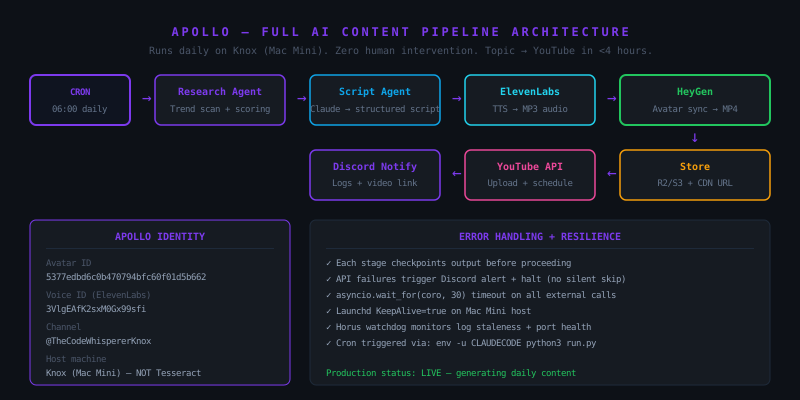
System Identity
Directory: ~/content-pipeline/
Repository: your-org/content-pipeline
Host: Content host (Mac Mini) — not the dedicated trading server
Trigger: launchd cron job, 06:00 daily
Avatar ID: <your-avatar-id>
Voice ID: <your-voice-id> (ElevenLabs)
Channel: @TheCodeWhispererKnox
The hosting decision is deliberate. A dedicated trading server (LAN) runs trading services — Foresight and other prediction systems — because those systems need direct network access for market data. Everything else runs on the content host. Content is not trading. Content pipelines belong on the content host.
The Five Stages
Stage 1: Topic Selection (Research Agent)
The research agent runs first. Its job is to identify the highest-signal topic for the day given current trends in AI engineering, developer tooling, and system design.
It queries multiple sources — web search, trending GitHub repositories, recent X/Twitter signals from technical accounts — and scores each candidate topic on three dimensions: novelty (is this genuinely new?), search demand (are people looking for this?), and alignment with Knox's audience (is this relevant to AI operators and developers?).
The top-scoring topic is written to an intake file that the script agent reads.
Known failure mode: if the research agent's API call to web search fails, the intake file may be empty. The pipeline has a check: if intake is empty at script generation time, the run halts and alerts Discord rather than generating a video on a null topic.
Stage 2: Script Generation (Claude)
The script agent reads the topic and generates a structured 3-5 minute script. The structure is rigid:
- Hook (30 seconds) — the reason to keep watching
- Core content (3-4 minutes) — the substantive teaching or analysis
- CTA (30 seconds) — subscribe, comment, what's next
The script is written in Knox's voice — direct, technical, operator-focused. The system prompt for the script agent has been iterated over multiple weeks of production and currently produces scripts that require minimal post-generation editing.
The script is validated for minimum length (under 600 words gets flagged — too short for a substantive YouTube video) and maximum length (over 1,500 words gets truncated — avatar video over 10 minutes loses audience retention).
Stage 3: Voice Synthesis (ElevenLabs)
The validated script feeds directly to ElevenLabs using Knox's cloned voice. The API call uses eleven_turbo_v2 for latency efficiency — the turbo model generates audio approximately 3x faster than eleven_multilingual_v2 with minimal quality difference for conversational content.
The output is an MP3 audio file stored locally. Duration is measured — this becomes the timing reference for the HeyGen avatar video.
ElevenLabs adds natural pause behavior around punctuation. For scripts that need explicit pacing breaks (transitions, dramatic pauses), SSML <break time="1s"/> tags are inserted by the script agent at appropriate locations.
Stage 4: Avatar Video Generation (HeyGen)
The HeyGen API receives:
avatar_id: Knox's digital twinaudio_url: the ElevenLabs MP3 uploaded to temporary storagebackground: office settingaspect_ratio: "16:9"
HeyGen generates the video asynchronously. The pipeline's polling loop checks every 10 seconds for up to 15 minutes. If generation exceeds 15 minutes, the job is assumed failed, an alert fires to Discord, and the run terminates.
On success, the video is downloaded to local storage immediately. HeyGen's hosted video URL expires — you cannot rely on it for downstream use.
Stage 5: YouTube Publish
The YouTube Data API v3 handles upload and scheduling. The video is uploaded with:
- Title: generated by the script agent alongside the script
- Description: auto-generated with timestamps, relevant links, and subscription CTA
- Tags: derived from the topic and aligned to YouTube search behavior
- Thumbnail: generated separately using Gemini (mcp-image) from a title card prompt
- Schedule: set for peak audience time (12:00 EST by default, adjustable)
After upload, the video URL is sent to the Discord logs channel so Knox can review without visiting YouTube.
Failure Modes and Mitigations
Production systems fail. This pipeline has failed in specific ways and has been hardened against each.
ElevenLabs rate limit — the API has rate limits that can be hit if previous runs left open connections. Mitigation: exponential backoff on 429 responses, with a maximum 3 retry ceiling before alerting and halting.
HeyGen generation failure — HeyGen occasionally returns a failed job status without an error message. Mitigation: treat any non-"completed" status after timeout as failure, alert Discord with the job_id for manual investigation.
YouTube upload rejection — the YouTube API rejects uploads that violate community guidelines at the content review stage (not detectable in advance). Mitigation: alert Discord with rejection reason; this requires manual resolution and cannot be auto-retried with the same content.
Script quality degradation — Claude occasionally produces scripts that drift from the target format, particularly when the research topic is ambiguous. Mitigation: word count validation catches most drift. Adding a human-review Discord notification before HeyGen generation is a planned improvement.
Infrastructure
The pipeline runs under launchd on the content host with KeepAlive=false (it is a cron job, not a daemon). The plist triggers Python at 06:00 daily with the full homebrew Python path and the necessary environment variables:
<key>ProgramArguments</key>
<array>
  <string>/opt/homebrew/bin/python3</string>
  <string>~/content-pipeline/run.py</string>
</array>
<key>StartCalendarInterval</key>
<dict>
  <key>Hour</key><integer>6</integer>
  <key>Minute</key><integer>0</integer>
</dict>
The watchdog service monitors the pipeline's log file for staleness. If the log file hasn't been written in 26 hours (indicating a skipped or silent-failure run), the watchdog service fires a Discord alert.
Lessons from Production
Intake.json is the most fragile component. If the research agent consumes a topic from the intake file but the downstream script generation fails, the topic is lost. The fix: don't consume the intake item until the script is confirmed valid. Stage consumption to match confirmed progress.
API call retry logic is not optional. Every external API call in the pipeline has had at least one transient failure in production. Retry logic is not defensive programming — it is required for a pipeline that runs without human supervision.
Log every stage. When something fails at 06:00 and you're reviewing it at 09:00, the logs are your only forensics. The pipeline logs stage entry, stage completion, and stage failure with timestamps and relevant IDs at every step.
Lesson 109 Drill
Design an equivalent pipeline for your own content use case. Document:
- What topic selection would look like for your niche
- What voice ID and avatar ID you would use (or plan to create)
- Where the video would publish
- What the 5 failure modes are and how you would detect each
You don't need to build it today. You need to know exactly what you're building before you write the first line of code. The architecture comes before the implementation.